
1. What is an ERP System and why it matters
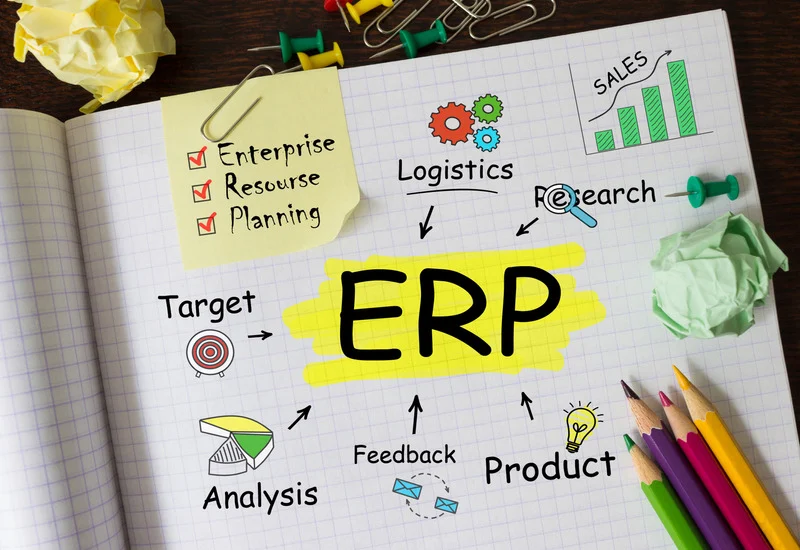
An Enterprise Resource Planning (ERP) system is an integrated software platform that allows businesses to manage core operations in one place. Instead of using separate tools for sales, inventory, accounting, and documentation, ERP systems connect these functions so information can be shared automatically and consistently.
ERP Systems in Small and Family Businesses
For small and family businesses, ERP systems support everyday activities such as order processing, stock management, invoicing, and reporting. By providing a single source of truth, ERP systems reduce duplication, improve visibility, and help businesses scale without increasing complexity.
2. Understanding data flow in an ERP system
Data flow refers to how information moves through an ERP system from one business function to another. Data is entered once and then used across departments, ensuring accuracy, consistency, and real-time updates.
- Reduces the need for manual hand-offs between teams
- Ensures everyone works with the same, up-to-date
information - Makes issues visible earlier in the process
- Supports faster operational and management decisions
Why Data Flow Matters
Efficient data flow reduces errors, saves time, and allows teams to focus on productive work rather than correcting mistakes. Poor data flow creates delays and hides problems until they become serious.
- Improves coordination between sales, warehouse, and finance teams
- Reduces stress caused by last-minute corrections and urgent fixes
- Provides management with timely and reliable operational insight
- Supports consistent service to customers
3. How business functions connect through data
A Typical Order Without Integration
In a non-integrated setup, a customer order is often handled through a series of disconnected steps. One person records the order details, another manually updates inventory records, and a third prepares the invoice using separate tools. Because information is transferred manually between people and systems, delays and misunderstandings are common, and errors may only be discovered late in the process, such as during delivery or billing.
- Information must be transferred manually between people or systems
- Errors often appear late, during delivery or invoicing
- Time is spent checking and correcting data instead of serving customers
- Accountability becomes unclear when issues arise
The Same Order in an ERP System
In an ERP system, once a sales order is entered, inventory updates automatically, the warehouse receives the picking list, accounting generates the invoice, and documentation is stored digitally, without re-entering data.
- Tasks are triggered automatically without extra communication
- Fewer checks are needed because data is consistent across systems
- Issues can be detected early, before they affect customers
- Staff can focus on coordination and service rather than administration
4. Identifying and improving data flow problems
What Good Data Flow Looks Like
After seeing how an ERP system handles a typical order, it becomes easier to recognise what effective data flow looks like in practice. When information moves smoothly across functions, work is coordinated, responsibilities are clear, and problems are addressed early rather than after they escalate.
- Information moves without manual follow-ups: data is passed automatically between systems and teams without emails or phone calls.
- Each team knows what to do and when: tasks are triggered clearly, reducing confusion and delays
- Changes are visible across the business immediately: updates made in one area are reflected everywhere in real time.
- Decisions rely on current, reliable data: managers and staff act based on accurate information rather than assumptions.
How to Spot Data Flow Problems
Data flow problems often become visible during busy periods, rapid growth, or unexpected changes in demand. They may appear as frequent last-minute checks, repeated corrections, or confusion about which information is correct. When teams rely on manual updates, paper documents, or disconnected tools, small issues can accumulate and only surface at the end of the month, during audits, or when customers are affected. Paying attention to these patterns helps identify where data is not flowing smoothly through the system.
Reviewing Your Current Data Flows
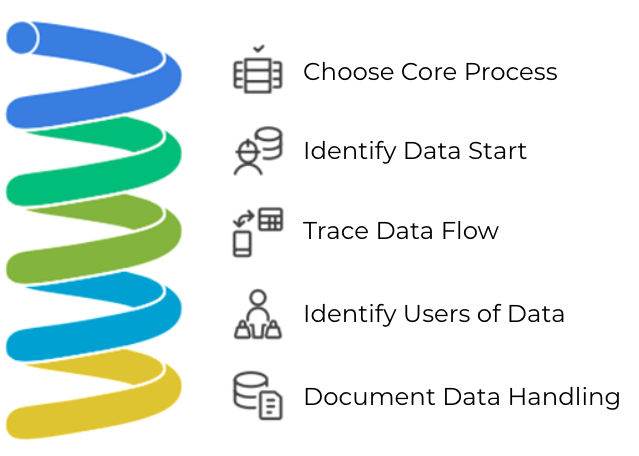
You do not need technical expertise to review data flow. Walking through a single process step by step often reveals inefficiencies and opportunities for improvement. Start by choosing one core process, such as handling customer orders or managing inbound deliveries.
Ask yourself:
- Where data starts
- Where it goes next
- Who handles it
- How it is recorded
Practical Ways to Improve Data Flow
Improving data flow does not require major investment. Small, targeted actions can deliver significant benefits.
- Automate manual tasks
- Connect your systems. ERP solutions offer turnkey integrations that simply need to be enabled.
- Embrace electronic document management
- Train your team. Even the best tools fail if people aren’t confident using them. A quick hands-on session or one-page cheat sheet can dramatically increase adoption and reduce errors.
- Ask for expert input. Outside advice can help you bypass trial-and-error and implement proven practices faster.
Learning Activity: Data Flow in Your Business
In this activity, you will examine one real process in your business and trace how information moves from start to finish. The goal is to see where data is delayed, repeated, or unclear, so you can identify simple improvements.
Step-by-Step Guide:
1. Choose one process
Select one everyday operation
2. Define the starting point
Identify where the data first appears (e.g., phone call, email, CRM entry, paper form).
3. Track each hand-off
Write down every person or department that touches the data as the process continues.
4. List the tools used
Note where the data is recorded (ERP, spreadsheet, email, paper, accounting software).
5. Mark the end point
Identify where the data finally “lands” (invoice issued, stock updated, delivery completed, payment recorded).
6. Circle any weak points
Highlight steps that feel slow, repetitive, confusing, or dependent on memory.
5. Key takeaways and next steps
Understanding data flow within an ERP system supports smoother operations, faster decisions, and sustainable growth. By starting small and improving continuously, family businesses can build systems that truly support their daily work.
Immediate Next Steps
-
Review one key workflow
-
Improve one data connection
-
Test, measure, and refine
-
Keep learning and improving
6. Self-Assessment
7. Resources and Further Reading
- “How to Choose the Right ERP System” – Zoho ERP Guide Practical tips for selecting an ERP solution that fits your business size and needs. zoho.com/erp
- “Digital Tools for SMEs” – European Commission SME Portal Explore EU-supported digital tools and resources tailored for small businesses. single-market-economy.ec.europa.eu
- “The Lean Small Business: Streamlining Operations” – Harvard Business Review Insightful article on how small businesses can simplify operations and improve efficiency. hbr.org
8. References
Aalto University. (2023). Adopting digital and ERP processes in SMEs. aalto.fi
ASAR Digital. (2024). ERP for small and medium-sized enterprises (SMEs). asardigital.com
Haddara, M., & Zach, O. (2011). ERP systems in SMEs: A literature review. doi.org/j.procs.2011.04.011
Harvard Business Review. (n.d.). The lean small business: Streamlining operations. hbr.org
IBB ERP. (2023). Guide to implementing a successful ERP system in your SME. ibberp.com
Oracle NetSuite. (n.d.). ERP basics for small businesses. netsuite.com
QuickBooks Commerce. (n.d.). Inventory management for small businesses. quickbooks.intuit.com
Synergix Technologies. (2025). The ultimate SME guide to ERP projects. synergix.com
TCS iON BizHub. (2025). ERP implementation lifecycle: A complete guide for MSMEs. tcsion.com
Zapier. (n.d.). Workflow automation tools for SMEs. zapier.com/blog
Zoho. (n.d.). How to choose the right ERP system. zoho.com/erp